Digital Signatures, PKI, and KDC: Building Trust in Secure Communication
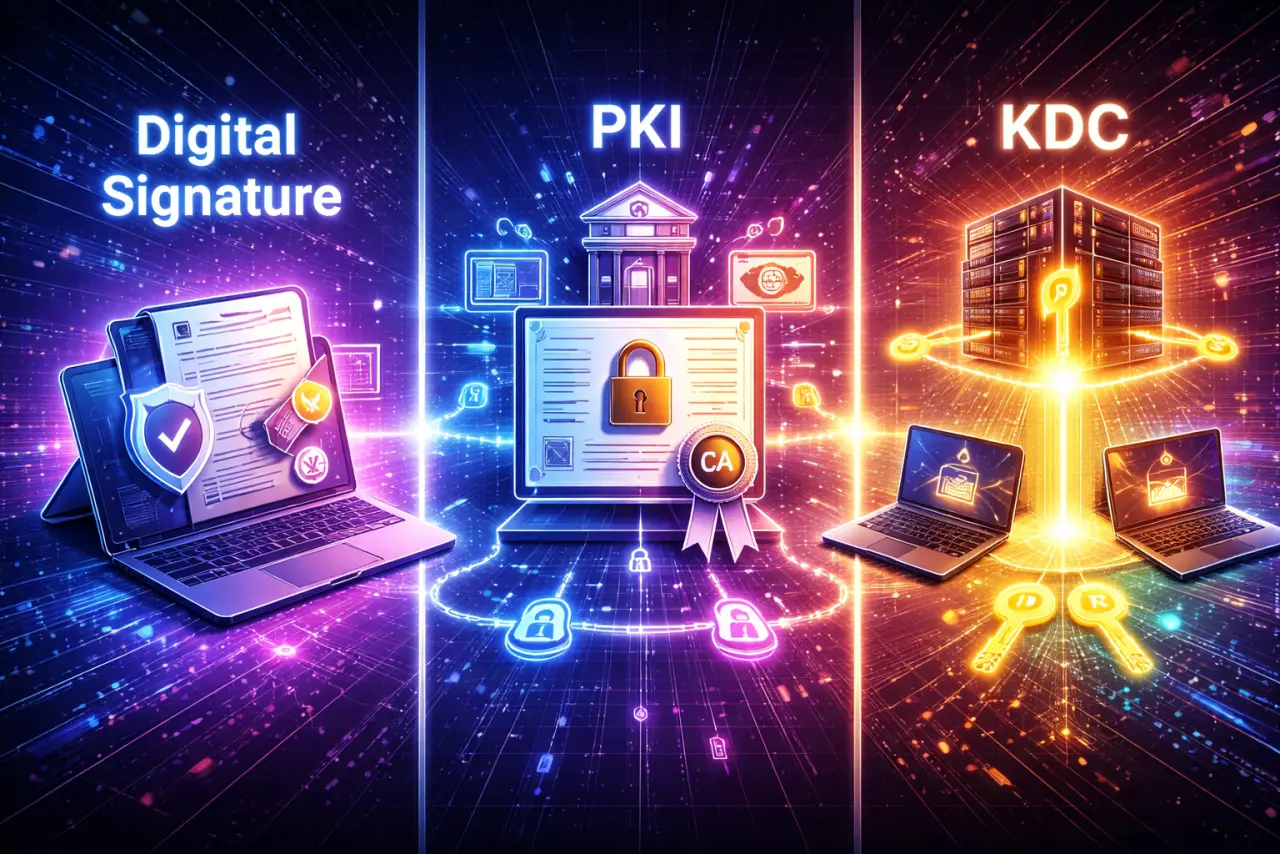
Digital Signatures, PKI, and KDC: Building Trust in Secure Communication
Modern cryptography is not just about encrypting data—it is about trust.
How do we know who sent a message?
How do we know it wasn't modified?
How do we distribute keys securely at scale?
This blog explains three foundational concepts that answer these questions:
- Digital Signatures
- Public Key Infrastructure (PKI)
- Key Distribution Center (KDC)
1. Digital Signatures: Proving Identity and Integrity
What Is a Digital Signature?
A digital signature is the electronic equivalent of a handwritten signature.
It verifies:
- Authentication → who sent the message
- Integrity → message was not altered
- Non-repudiation → sender cannot deny sending it
Key Difference from Encryption:
Unlike encryption, a digital signature does not hide the message—it proves who created it.
How Digital Signatures Work
Digital signatures use asymmetric (public-key) cryptography and hash functions.
Signing Process (Sender A)
Step 1: Create the Message
Sender writes the message
Step 2: Compute Hash
Computes a hash of the message:
Why Hash?
- Messages can be very large
- Hashing makes signing fast
- Any change in the message changes the hash
Step 3: Encrypt Hash with Private Key
Encrypts the hash using their private key:
✔️ The encrypted hash () is the digital signature
Complete Signing Process:
Message (M) → Hash(M) → Encrypt with Private Key → Signature (S)
Verification Process (Receiver B)
Step 1: Compute Hash of Received Message
Receiver computes:
Step 2: Decrypt Signature
Decrypts the signature using sender's public key:
Step 3: Compare Hashes
Compares and :
- If equal → message is authentic and unchanged
- If not → message is tampered or sender is fake
Complete Verification Process:
Message (M) → Hash(M) = H₁
Signature (S) → Decrypt with Public Key = H₂
Compare H₁ and H₂ → Authentic if equal
Why This Works:
- Hash ensures integrity — Any change in message changes hash
- Private key ensures authentication — Only sender has private key
- Public key verifies — Anyone can verify using public key
- Non-repudiation — Sender cannot deny (only they have private key)
Why Hashing Is Used
The Problem:
- Messages can be very large (GBs or TBs)
- Encrypting entire message with private key is slow
The Solution: Hash Functions
- Fast — Hash computation is very efficient
- Fixed size — Hash output is always same size (e.g., 256 bits)
- Deterministic — Same input always produces same output
- One-way — Cannot recover message from hash
- Avalanche effect — Small change in message → completely different hash
Example:
- Message: "Hello World" → Hash:
a591a6d40bf420404a011733cfb7b190d62c65bf0bcda32b57b277d9ad9f146e - Message: "Hello World!" → Hash:
7f83b1657ff1fc53b92dc18148a1d65dfc2d4b1fa3d677284addd200126d9069
Even a single character change produces a completely different hash.
Why Symmetric Keys Cannot Be Used
The Problem with Symmetric Keys:
With symmetric keys:
- Both parties share the same secret
- Either party could forge a signature
- No way to prove who actually signed
Why Asymmetric Cryptography Works:
- Private key is secret — Only sender has it
- Public key is public — Anyone can verify
- Cannot forge — Cannot create valid signature without private key
- Non-repudiation — Sender cannot deny signing
✔️ Digital signatures require asymmetric cryptography
2. PKI (Public Key Infrastructure): Trust at Internet Scale
The Problem PKI Solves
Public-key cryptography assumes:
This public key belongs to this person.
But how do we prove that?
The Trust Problem:
Without verification, attackers can:
- Replace public keys — MITM attack
- Impersonate users — Fake identity
- Perform man-in-the-middle attacks — Intercept and modify
Example Attack:
- Alice wants to communicate with Bob
- Attacker intercepts communication
- Attacker sends their own public key to Alice (claiming it's Bob's)
- Alice encrypts message with attacker's public key
- Attacker decrypts, reads, re-encrypts with Bob's real key
- Bob receives message (thinks it's from Alice)
- Attack successful — Attacker reads all messages
PKI exists to solve this trust problem.
What Is PKI?
Public Key Infrastructure (PKI) is a system of:
- Digital certificates — Bind identity to public key
- Certificate Authorities (CAs) — Trusted entities that sign certificates
- Verification mechanisms — Methods to verify certificate authenticity
It ensures that a public key is authentic.
Key Components:
- Certificate Authority (CA) — Trusted third party
- Registration Authority (RA) — Verifies identities
- Certificate Repository — Stores certificates
- Certificate Revocation List (CRL) — Lists revoked certificates
Digital Certificates
What Is a Certificate?
A digital certificate binds:
- An identity (domain name, organization, user)
- To a public key
The certificate is digitally signed by a trusted CA.
Certificate Contents:
- Subject — Identity (e.g.,
example.com) - Public Key — The public key being certified
- Issuer — CA that signed the certificate
- Validity Period — Start and end dates
- Serial Number — Unique identifier
- Digital Signature — CA's signature
Example:
Certificate for: example.com
Public Key: 0x1234...abcd
Issued by: Let's Encrypt
Valid: 2026-01-01 to 2026-04-01
Signature: [CA's signature]
Role of Certificate Authorities (CA)
What Is a CA?
A Certificate Authority (CA) is a trusted entity that:
- Verifies identities — Confirms who owns the public key
- Signs public keys — Creates digital certificates
- Acts as a trust anchor — Others trust the CA
How CAs Work:
- User generates key pair — Public and private key
- User requests certificate — Sends public key + identity proof
- CA verifies identity — Confirms user owns the identity
- CA signs certificate — Creates certificate with CA's private key
- Certificate distributed — User can now use certificate
Trust Chain:
Root CA (self-signed)
    ↓
Intermediate CA (signed by Root)
    ↓
End-Entity Certificate (signed by Intermediate)
Examples:
- HTTPS websites — Browsers trust CAs to verify website identity
- Email security — Email certificates verify sender identity
- Code signing — Software certificates verify publisher identity
How PKI Works (Simplified)
Step-by-Step Process:
1. User generates a key pair
- User creates public/private key pair
- Private key kept secret
- Public key will be certified
2. CA verifies user identity
- User provides identity proof
- CA verifies ownership (e.g., domain control)
- CA confirms user is legitimate
3. CA signs the public key → certificate
- CA creates certificate binding identity to public key
- CA signs certificate with CA's private key
- Certificate is now trusted
4. Others trust the key because they trust the CA
- Recipients verify certificate using CA's public key
- If certificate is valid, public key is trusted
- Communication can proceed securely
✔️ This is how HTTPS works in browsers
HTTPS Example:
- Website requests certificate from CA
- CA verifies website owns domain
- CA issues certificate
- Browser connects to website
- Website presents certificate
- Browser verifies certificate using CA's public key
- If valid, browser trusts website's public key
- Secure connection established
Why PKI Is Secure
Security Properties:
- ✅ Public keys are authenticated — Certificates prove ownership
- ✅ MITM attacks are prevented — Cannot forge certificates without CA's private key
- ✅ Trust is hierarchical and verifiable — Certificate chain can be verified
- ✅ Revocation possible — Certificates can be revoked if compromised
Trust Model:
- Centralized trust — Everyone trusts the CA
- Hierarchical — Root CA → Intermediate CA → End certificate
- Verifiable — Certificate chain can be verified
- Revocable — Compromised certificates can be invalidated
Limitations:
- ⚠️ CA compromise — If CA is compromised, all certificates are at risk
- ⚠️ Single point of trust — Relies on CA being trustworthy
- ⚠️ Revocation checking — Must check if certificate is revoked
For more details on certificate hierarchy and revocation, see: Understanding the X.509 Certificate Hierarchy and Revocation.
3. KDC (Key Distribution Center): Centralized Symmetric Trust
What Is a KDC?
A KDC is an alternative to public-key digital signatures for authentication. A Key Distribution Center (KDC) is a trusted third party that:
- Generates session keys — Creates temporary keys for communication
- Distributes them securely — Sends keys to authorized parties
- Uses symmetric cryptography — Faster than asymmetric
Key Characteristics:
- Centralized — Single trusted server
- Symmetric — Uses shared secret keys
- Session-based — Generates temporary keys
- Enterprise-focused — Common in internal networks
KDCs are common in enterprise and internal networks.
How KDC Works (High Level)
Setup Phase:
- Each user shares a master key with the KDC
- Users do not share keys with each other
- KDC knows all master keys
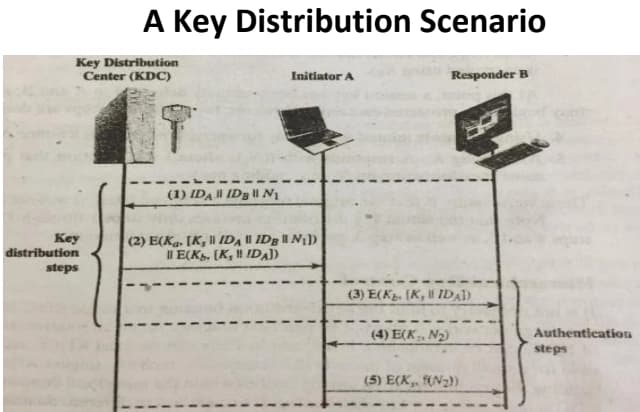
Session Key Distribution:
- User A requests session key to talk to User B
- KDC generates session key ()
- KDC encrypts session key separately for A and B:
- Encrypted with A's master key:
- Encrypted with B's master key:
- KDC sends both to User A
- User A forwards B's copy to User B
- Both decrypt using their master keys
- Mutual authentication confirms key ownership
✔️ A and B now share a secure session key
Key Insight:
- Users never share master keys with each other
- Only KDC knows all master keys
- Session keys are temporary and unique
- Each session gets a new key
Example Scenario
Detailed Flow:
Step 1: User A Requests Session Key
A → KDC: "I want to talk to B"
Step 2: KDC Generates Session Key
KDC generates: K_s = random_session_key()
Step 3: KDC Encrypts Session Key
For A: E_{K_A}(K_s, "A", timestamp) //The tuple (K_s, "A", timestamp) encrypted using the symmetric key K_A
For B: E_{K_B}(K_s, "A", timestamp) //The tuple (K_s, "A", timestamp) encrypted using the symmetric key K_B
Step 4: KDC Sends to A
KDC → A: {E_{K_A}(K_s, ...), E_{K_B}(K_s, ...)}
Step 5: A Forwards B's Copy
A → B: E_{K_B}(K_s, "A", timestamp)
Step 6: Both Decrypt
A decrypts: D_{K_A}(E_{K_A}(K_s, ...)) = K_s
B decrypts: D_{K_B}(E_{K_B}(K_s, ...)) = K_s
Step 7: Mutual Authentication
A → B: Challenge encrypted with K_s
B → A: Response encrypted with K_s
Both verify → Session established
Security Features:
- Timestamp — Prevents replay attacks
- Mutual authentication — Both parties verify each other
- Session keys — Temporary, unique per session
- Master keys — Never transmitted, only used for encryption
Advantages of KDC
Benefits:
- ✅ Centralized key management — Single point of control
- ✅ Fewer keys to store — Each user only stores one master key
- ✅ Efficient for closed systems — Fast symmetric cryptography
- ✅ Scalable — Easy to add/remove users
- ✅ Session keys — Temporary keys reduce compromise impact
Use Cases:
- Enterprise networks — Internal authentication
- Active Directory — Windows domain authentication
- Kerberos — Cross-platform authentication
- Internal services — Service-to-service authentication
Disadvantages of KDC
Limitations:
- ⚠️ Single point of failure — If KDC is down, no authentication
- ⚠️ Must always be online — Requires constant availability
- ⚠️ If compromised, entire system is at risk — All master keys exposed
- ⚠️ Centralized trust — All trust in one entity
- ⚠️ Not suitable for internet scale — Works best in closed networks
Mitigation Strategies:
- Redundancy — Multiple KDC servers
- High availability — Clustering and failover
- Security hardening — Strong physical and network security
- Regular audits — Monitor for compromise
How These Concepts Work Together
In Real Systems:
- Digital Signatures → prove identity and integrity
- PKI → verifies public keys used for signatures
- KDC → efficiently distributes symmetric session keys
Final Takeaway
Summary:
- ✅ Digital signatures prove who sent a message — Authentication, integrity, non-repudiation
- ✅ PKI ensures public keys are trustworthy — Certificate-based trust
- ✅ KDC simplifies symmetric key distribution — Centralized key management
- ✅ Together, they form the backbone of secure communication — Trust at scale
One-Line Summary
Digital signatures establish authenticity, PKI establishes trust in public keys, and KDC enables secure symmetric key distribution—together enabling secure communication at scale.