Secure Authentication Protocols: Tokens, Biometrics, and Replay-Resistant Design

Secure Authentication Protocols: Tokens, Biometrics, and Replay-Resistant Design
Modern authentication systems must do more than identify users—they must verify identity securely over untrusted networks. This requires protocols that prevent password exposure, resist replay attacks, and defend against eavesdropping and spoofing. This article explores how token-based authentication, biometric authentication, and challenge–response mechanisms work together to achieve secure verification in practice.
Password Verification Without Transmitting Passwords
A core principle of secure authentication is never sending the actual password over the network. Instead, systems rely on challenge–response protocols that prove knowledge of a secret without revealing it.
Challenge–Response Concept
Rather than transmitting a password, the server generates a random challenge (nonce) to ensure freshness. The user responds with a computed value derived from the password and the challenge.
Authentication Flow
-
The user sends a login request containing their username.
-
The server generates a random number r (nonce) and sends it to the user.
-
The user computes a response using a function such as:
f(r, h(P))where:
Pis the passwordh(P)is the hash of the passwordf()is a secure combination function
-
The computed response is sent back to the server.
-
The server independently computes the expected value and compares it.
-
If the values match, authentication succeeds. Otherwise, access is denied.
Why This Approach Is Secure
- The password itself never travels across the network.
- Each login attempt uses a new random value r.
- Previously captured authentication messages cannot be reused.
Preventing Replay Attacks with Nonces
A replay attack occurs when an attacker records a valid authentication message and resends it later to gain unauthorized access.
Defense Mechanisms
Modern systems prevent replay attacks by using:
- Random nonces
- Timestamps
- One-time session tokens
Because each authentication attempt requires a fresh challenge, captured messages become invalid as soon as the session ends.
Common Protection Model
A common protection model is:
f(r, h(p))
Where:
r= random nonce (changes every session)p= passwordh(p)= password hash
Even if an attacker records a login exchange, it cannot be reused because r will be different next time.
How the Host Verifies Authentication
The server verifies the client's response by independently computing the expected value and comparing it with the received response.
Verification Process:
-
Server receives the client's response:
f(r', h(p))r'= nonce received from the client (should match the noncerthe server sent)h(p)= hash of the password the client used
-
Server computes the expected value:
f(r, h(p_u))r= original nonce the server generated and senth(p(u))= stored hash of the user's password in the database
-
Server compares the values:
f(r', h(p)) = f(r, h(p(u)))
Verification Conditions:
For authentication to succeed, both conditions must be true:
- ✅ Nonce match:
r' = r(client used the correct nonce) - ✅ Password match:
h(p) = h(p_u)(client knows the correct password)
If both values match, authentication succeeds. Otherwise, access is denied.
How Nonces Prevent Replay Attacks
Example Scenario:
- Attacker intercepts authentication message:
username, f(r1, h(P)) - Attacker attempts to replay this message in a new session
- Server generates a new random nonce
r2(different fromr1) - Attacker's replayed message uses
r1, but server expects response withr2 - Authentication fails—replay attack prevented
Key Properties of Nonces:
- Unpredictable (cryptographically random)
- Unique for each session
- Time-limited (expire after a short period)
- Large enough to prevent brute-force guessing
Token-Based Authentication
Token-based authentication strengthens security by relying on something the user has, rather than only something they know.
Types of Tokens
- Smart cards
- Memory cards
- USB security keys (e.g., YubiKey)
- Software tokens (mobile apps)
Tokens are often combined with a PIN or password, forming two-factor authentication (2FA).
Basic Idea
Instead of typing a static password, the user relies on a physical or software token that generates dynamic, one-time credentials.
Authentication Flow
- The server sends a random challenge r.
- The token generates a one-time value W' based on its secret and the challenge.
- The client computes and sends:
f(r, h(W')) - The server verifies the response using its stored token key.
- If the values match, login succeeds.
Real-World Examples
- Google Authenticator: Time-based one-time passwords (TOTP)
- RSA tokens: Hardware tokens generating rotating codes
- Hardware security keys such as YubiKey: USB/NFC devices supporting FIDO2/WebAuthn
Security Benefits
- ✅ Credentials are valid only once.
- ✅ Password theft alone is insufficient to gain access.
- ✅ Strong resistance to replay and phishing attacks.
Drawbacks
- ⚠️ Requires specialized hardware or software
- ⚠️ Tokens can be lost, stolen, or damaged
- ⚠️ Additional cost and complexity
- ⚠️ User must have token available
Token-Based Authentication Flows
Memory Card Authentication
Common examples include ATM cards and hotel room key cards.
Flow:
- User inserts the card.
- Reader extracts stored data.
- System checks the database.
- User may enter a PIN.
- If matched, access is granted.
Limitations:
- Stores static data
- Easy to copy if stolen
- No cryptographic processing inside the card
- Vulnerable to skimming attacks
Security Level: ⚠️ Low—relies primarily on physical possession
Real-Life Token-Based Authentication Example (Memory-Like Token)
Example: Office Door Access with a USB Token
Setup:
A company gives employees a USB drive (acts like a memory card).
Inside the USB:
auth_token.bin(static authentication token)
The server knows:
hash(auth_token.bin)(stored hash of the token)
Daily Use:
- Employee plugs USB into office PC
- System reads
auth_token.bin - Token is sent to server
- Server matches hash
- Door / system unlocks
➡️ This is token-based authentication
➡️ USB = "something you have"
Now the Theft Scenario (Real Life):
What happens if USB is stolen?
- Attacker plugs USB into their PC
- Copies
auth_token.bin - Writes it to another USB
- Uses cloned USB
- System unlocks 🤷♂️
Nothing was "broken":
- No password cracked
- No encryption broken
- Just copy + replay
This is why memory-based tokens are weak:
- ✅ Token is static
- ✅ Token is readable
- ✅ Token is copyable
The Problem: The authentication token is just a file that can be copied. There's no cryptographic protection, no challenge-response mechanism, and no way to detect if the token has been cloned. An attacker who gains physical access to the USB drive can easily create unlimited copies.
Better Alternative: Smart cards with cryptographic processing would prevent this attack because:
- Private keys never leave the card
- Each authentication requires a fresh challenge
- Cloning the card doesn't reveal the private key
Smart Card Authentication
Smart cards contain a CPU and memory, enabling cryptographic operations.
Dynamic Challenge–Response Flow:
- User inserts the card or uses NFC.
- Server sends a random challenge.
- Card signs or hashes the challenge using its private key.
- Response is returned to the server.
- Server verifies using the card's public key certificate.
- If valid, access is granted.
This approach prevents replay attacks and offers significantly stronger security than memory cards.
Advantages:
- ✅ Cryptographic operations performed on-card
- ✅ Private keys never leave the card
- ✅ Dynamic, session-specific responses
- ✅ Resistant to cloning and replay attacks
Security Level: ✅ High—strong cryptographic protection
Real-Life Smart Card Authentication Example
Example: Visa / MasterCard Chip Cards
When you insert a chip card:
- POS (Point of Sale) terminal sends a transaction-specific challenge
- Card generates a cryptographic signature (ARQC - Application Cryptogram)
- Bank verifies the signature
- Transaction approved
✔️ That's why chip cards can't be cloned
✔️ Magnetic stripes can be cloned — chips can't
Security Factors Used:
- Something you have → the card
- Something you know → PIN (usually)
Flow:
- Dynamic challenge–response
- Cryptographic proof
- PIN verification
➡️ If card is stolen but PIN is unknown:
- ❌ ATM withdrawal fails
- ❌ Most POS transactions fail
- ✔️ Card cannot be cloned
- ✔️ Replay attacks impossible
✅ This is strong authentication
Why Chip Cards Are Secure:
Unlike magnetic stripe cards (which are like memory cards), chip cards:
- ✅ Perform cryptographic operations on-card — Each transaction uses a unique challenge
- ✅ Private keys never leave the card — Even if the card is physically examined, keys cannot be extracted
- ✅ Dynamic authentication — Each transaction generates a unique cryptogram (ARQC) that cannot be reused
- ✅ PIN protection — Even if the card is stolen, the PIN is required for most transactions
Comparison:
| Feature | Magnetic Stripe | Chip Card |
|---|---|---|
| Data Storage | Static account number | Dynamic cryptographic keys |
| Authentication | Static data read | Challenge-response with signature |
| Cloning | Easy (just copy data) | Impossible (keys can't be extracted) |
| Replay Attacks | Possible | Prevented (unique challenge each time) |
| Security Level | ⚠️ Low | ✅ High |
User Authentication Using e-ID
An electronic ID (e-ID) is a digital version of a national identity card, typically implemented using a smart card.
Key Features
- ✅ Secure digital identity
- ✅ Cryptographic keys stored on-chip
- ✅ Supports authentication and digital signatures
- ✅ Government-issued and legally recognized
Common Uses
- Government services (e-passports, border control)
- Secure online authentication
- Digital signing (eSign)
- Banking and financial services
- Healthcare systems
Typical e-ID Contents
- Personal data (name, date of birth, photo)
- Document number
- Card Access Number (CAN)
- Machine Readable Zone (MRZ)
- Private key (securely stored, never exported)
- Public key certificate
Authentication Flow Using e-ID
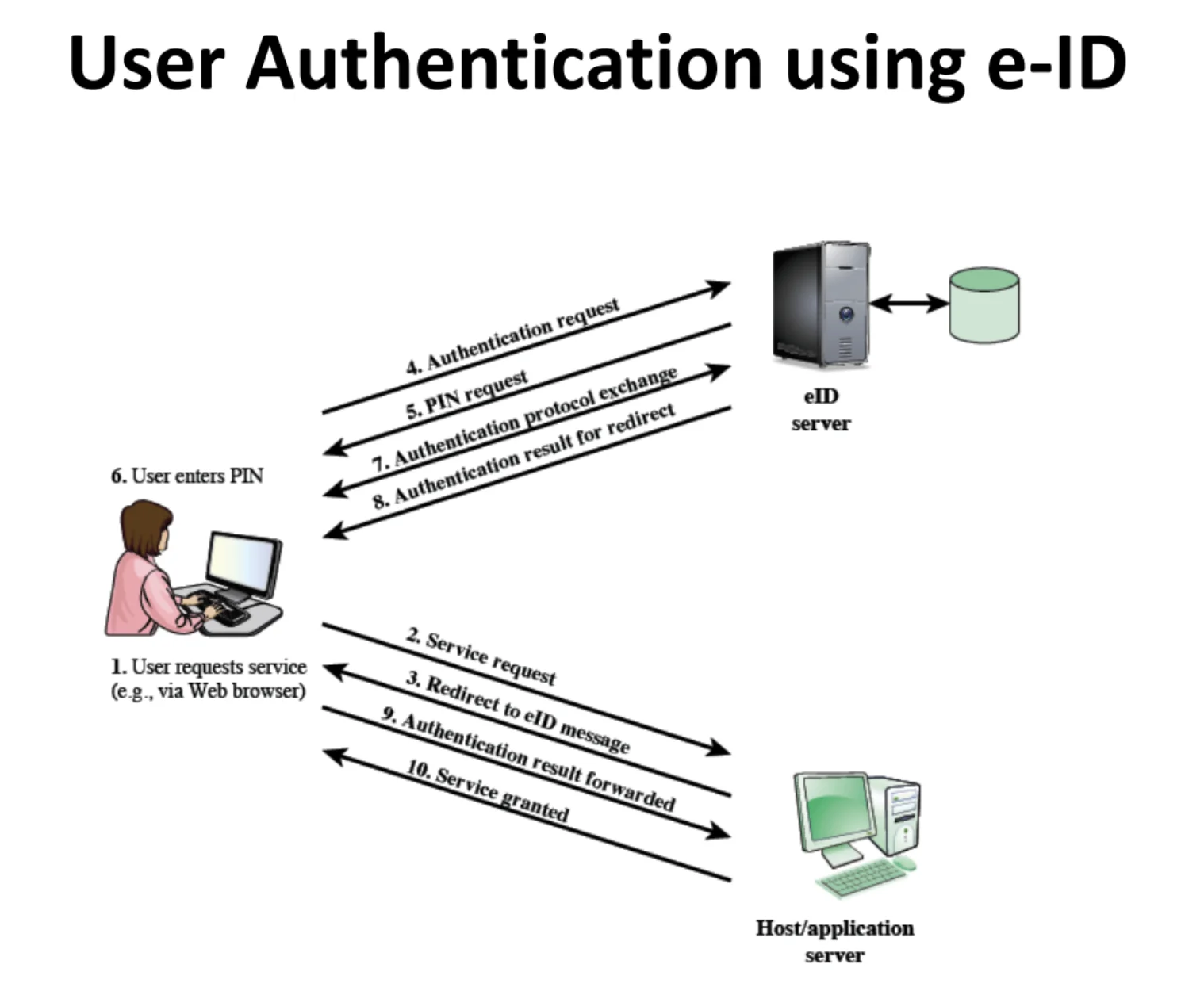
- User requests a service (e.g., government or bank website).
- Service redirects to the e-ID authentication portal.
- User inserts card and enters PIN.
- Server sends a random challenge.
- Card signs the challenge using its private key.
- Server verifies using the public key.
- Authentication result is returned.
- Access is granted securely.
Security Model:
Server Challenge → Card Signs with Private Key → Server Verifies with Public Key → Access Granted
Benefits:
- ✅ Strong authentication with legal binding
- ✅ Can't be forged or copied
- ✅ Supports non-repudiation
- ✅ Widely accepted by government and financial institutions
Biometric Authentication
Biometric authentication verifies identity using unique physical or behavioral characteristics.
Types of Biometrics
Physical Biometrics:
- Fingerprint
- Face recognition
- Iris scan
- Retina scan
- DNA (rare, mostly for forensic use)
Behavioral Biometrics:
- Voice recognition
- Typing rhythm (keystroke dynamics)
- Gait analysis
- Signature dynamics
Key Factors Affecting Accuracy
- Sensor quality: Higher resolution sensors provide better data
- Environmental conditions: Lighting, noise, temperature affect performance
- Threshold (tolerance) settings: Balance between false acceptances and false rejections
- Cost versus precision trade-offs: Higher accuracy often requires more expensive hardware
How Biometric Matching Works
Biometric systems do not perform exact matching. Instead, they:
- Calculate a similarity score between the captured sample and stored template
- Compare the score to a predefined threshold
- Grant access if similarity exceeds the threshold
Example:
- Stored template: Feature vector representing a fingerprint
- Captured sample: New fingerprint scan
- Similarity score: 0.95 (95% match)
- Threshold: 0.90
- Result: Match (0.95 > 0.90)
Static Biometric Authentication
Static biometrics rely on fixed physical traits such as fingerprints or facial features.
Authentication Flow
- Server sends a random challenge r.
- Client captures a biometric sample BT'.
- Client encrypts and sends:
where:
E(r, D', BT')D'is the biometric device usedBT'is the captured biometric template
- Server verifies:
- The challenge is fresh
- The device is trusted
- The biometric matches the stored template
- If all checks pass, authentication succeeds.
Why the Biometric Device Matters (D′ = D)
Many biometric systems verify not only the biometric data but also which device captured it.
- D = biometric device used during registration
- D′ = biometric device used during login
If D′ = D, the system trusts that the biometric came from a registered, tamper-resistant reader.
Why This Is Important
- ✅ Prevents spoofing using fake sensors or images
- ✅ Ensures trusted hardware is used
- ✅ Common in high-security environments such as banking and government systems
Attack Scenario Without Device Verification:
- Attacker captures a high-resolution photo of a user's fingerprint
- Attacker creates a fake fingerprint mold
- Attacker uses mold on any fingerprint reader
- Attack succeeds if device is not verified
Attack Scenario With Device Verification:
- Attacker creates fake fingerprint (same as above)
- Attacker attempts to use it on an unregistered device
- System detects
D' ≠ D(device mismatch) - Attack fails—authentication rejected
Logging In from Different Devices
Whether users can authenticate from another device depends on the system's security model.
High-Security Systems:
- Used in banks, government services, and PKI environments
- Only registered biometric devices are trusted
- New devices must be explicitly enrolled
- Example: Bank ATMs with registered fingerprint readers
Consumer and Cloud Systems:
- Used on smartphones and web platforms
- Biometric verification happens locally (e.g., Face ID, Touch ID)
- Servers receive only a confirmation, not biometric data
- Users can safely log in from multiple devices
- Example: Apple's Face ID authenticates locally, then sends encrypted token to server
Dynamic Biometric Authentication
Dynamic biometrics rely on behavioral patterns that change over time, such as typing rhythm, voice, or gait.
How It Works
- Server sends a random challenge r and an action x.
- User performs the action (e.g., speaks a phrase, types a sentence).
- A biometric signal BS′(x′) is captured and encoded.
- The encrypted response is sent to the server.
- Server verifies:
- Freshness of the challenge
- Correct action performed
- Behavioral similarity to stored profile
Use Cases
- Continuous authentication: Monitoring user behavior throughout a session
- Detecting account takeover after login
- Background monitoring without interrupting the user
- Fraud detection: Identifying unusual behavior patterns
Example: Typing Rhythm Authentication:
Challenge: "Please type: The quick brown fox"
User types the phrase
System captures:
  - Time between keystrokes
  - Pressure on keys
  - Typing speed variations
System compares to stored profile
Similarity score: 0.92
Threshold: 0.85
Result: Authenticated
Static vs Dynamic Biometrics
| Feature | Static Biometrics | Dynamic Biometrics |
|---|---|---|
| Examples | Fingerprint, Face, Iris | Typing rhythm, Gait, Voice |
| Nature | Fixed | Behavioral and changing |
| Accuracy | High | Moderate |
| Reliability | Stable | Can fluctuate |
| Use Case | One-time login | Continuous authentication |
| Cost | Higher hardware cost | Lower (existing sensors) |
| User Cooperation | Required | Can be passive |
| Enrollment | One-time | May require ongoing updates |
Dynamic biometrics are often combined with other factors as part of multi-factor authentication (MFA).
Handling Biometric Variability
Because biometric data is never identical (even the same finger scanned twice produces slightly different data), systems use various techniques to handle variability:
1. Similarity Thresholds
Problem: Exact matching is impossible due to natural variations
Solution: Use similarity scores with appropriate thresholds
Example:
- Threshold: 0.90 (90% similarity required)
- Legitimate user: 0.95 similarity → Accept
- Imposter: 0.60 similarity → Reject
2. Template Adaptation Over Time
Problem: Biometrics change over time (aging, injuries, etc.)
Solution: Gradually update stored templates with successful authentications
Approach:
- Start with initial template from enrollment
- After each successful authentication, slightly blend in new sample
- Template evolves while maintaining core characteristics
3. Feature Normalization
Problem: Environmental conditions affect biometric capture
Solution: Normalize features to account for variations
Examples:
- Normalize face images for lighting conditions
- Adjust voice samples for background noise
- Compensate for sensor quality differences
Conclusion
Secure authentication is built on freshness, secrecy, and verification without exposure. By combining challenge–response protocols, token-based systems, and both static and dynamic biometrics, modern systems achieve layered, replay-resistant authentication suited for real-world threats.
Key Takeaways:
- ✅ Never transmit passwords—use challenge-response protocols instead
- ✅ Prevent replay attacks with random nonces and timestamps
- ✅ Token-based authentication adds physical possession as a factor
- ✅ Biometric authentication provides convenience but requires proper implementation
- ✅ Multi-factor authentication significantly strengthens security
- ✅ Device verification prevents spoofing attacks
- ✅ Dynamic biometrics enable continuous authentication
The Future of Authentication: As threats evolve, authentication systems will continue to improve:
- Machine learning for better biometric recognition
- Quantum-resistant cryptography
- Passwordless authentication becoming mainstream
- Continuous adaptive authentication
- Privacy-preserving biometric techniques
Remember: No single authentication method is perfect. The best approach combines multiple layers of security, balances usability with security, and adapts to the threat landscape. Whether you're designing a new system or evaluating existing ones, these principles form the foundation of secure authentication in the modern world.