Recursion in Python — Beginner-Friendly Notes

Table Of Content
- 1. What Is Recursion?
- 2. The Two Main Parts of Recursion
- 3. The Call Stack
- EXAMPLE 1 — Printing While the Stack Grows
- EXAMPLE 2 — Printing While the Stack Unwinds
- EXAMPLE 3 — Factorial
- EXAMPLE 4 — Sum of Numbers from 1 to n
- EXAMPLE 5 — Sum of an Array
- EXAMPLE 6 — Reverse a String
- EXAMPLE 7 — Recursive Binary Search
- EXAMPLE 8 — Fibonacci
- Improving Fibonacci with Memoization
- 4. How to Write a Recursive Solution
- 5. Common Recursion Mistakes
- 6. Recursion vs Iteration
- 7. Recursion Depth in Python
- 8. Calculating Recursive Time Complexity
- QUICK RULES
- Final Summary
Recursion in Python — Beginner-Friendly Notes
Recursion can look confusing at first because a function appears to call itself again and again.
However, the basic idea is simple:
Recursion means solving a problem by reducing it to a smaller version of the same problem.
Every recursive function needs a condition that tells it when to stop. Otherwise, it will continue calling itself until the program produces an error.
1. What Is Recursion?
Recursion happens when a function calls itself.
Here is a simple example:
def hello():
    print("Hello")
hello()The function hello() prints "Hello" and then calls hello() again.
hello()
↓
hello()
↓
hello()
↓
hello()
↓
...This continues forever because there is no stopping condition.
Python eventually stops it with an error:
RecursionError: maximum recursion depth exceededTherefore, a proper recursive function must have a base case.
2. The Two Main Parts of Recursion
A recursive function normally contains two important parts:
- Base case → stops the recursion
- Recursive case → calls the function with a smaller problem
General structure:
def recursive_function(problem):
    if stopping_condition:
        return base_result

return recursive_function(smaller_problem)For example:
def countdown(n):
    if n == 0:          # base case
        return

    print(n)
countdown(n - 1) # recursive caseCalling:
countdown(3)Produces:
3
2
1Key idea
The base case stops recursion, while the recursive case moves the problem toward the base case.
3. The Call Stack
Python uses the call stack to manage function calls, local variables, and execution flow.
The stack follows:
Last In, First Out (LIFO)This means the most recently called function must finish first.
The program has one call stack. Every function call adds a new stack frame to it.
A stack frame is one individual entry inside that stack, created for one specific function call.
A stack frame stores information about that call, including:
- Its arguments and local variables
- Where the function paused
- Where execution should continue after another function returns
When a function is called, its frame is pushed onto the stack. When the function finishes, its frame is popped from the stack. Python handles both operations automatically.
Important: Each function call creates a stack frame—not a separate stack.
Even repeated calls to the same function have separate frames. Using the countdown example from above, after countdown(3) reaches the base case, the call stack looks like this:
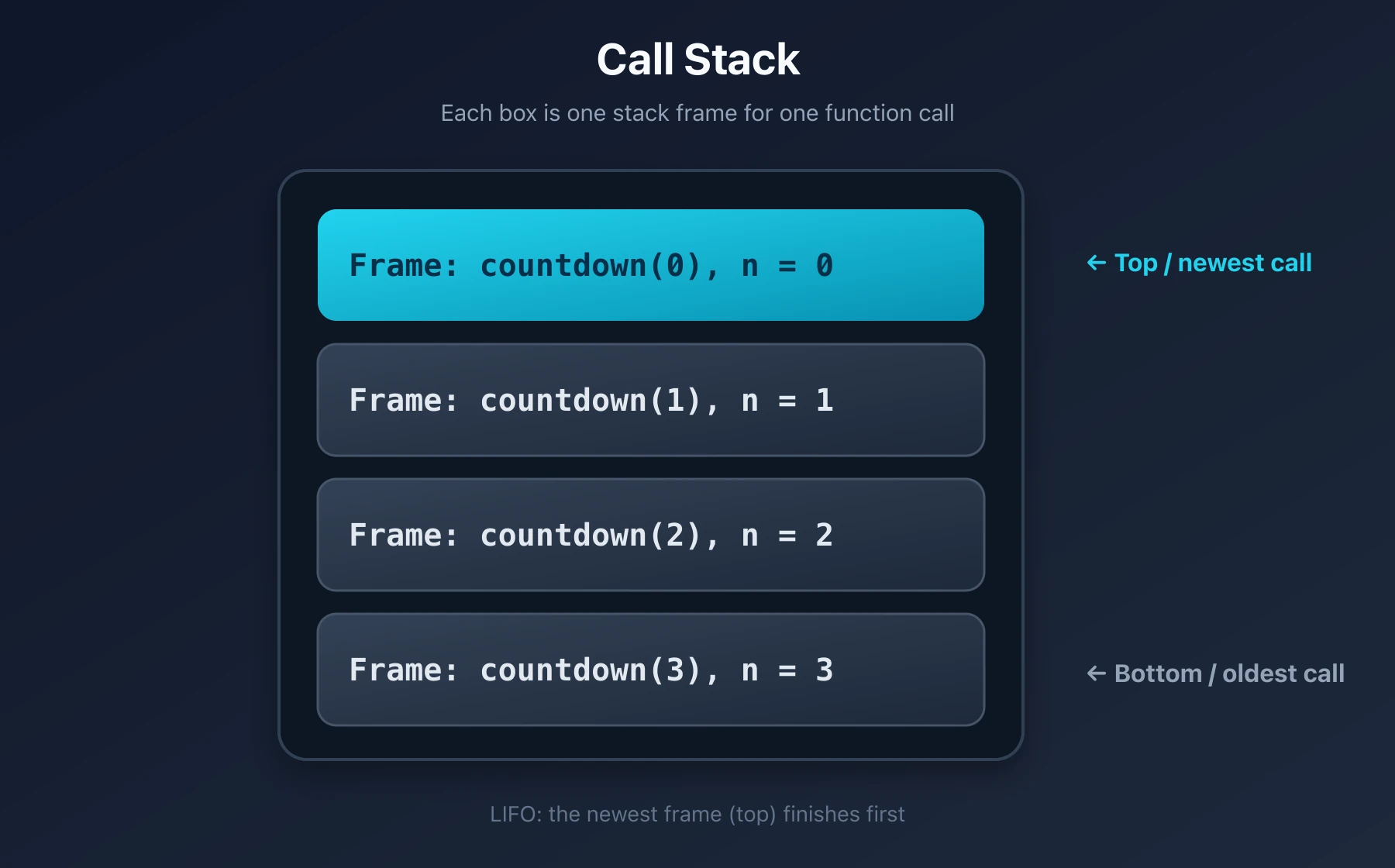
Because the stack is LIFO, countdown(0) finishes first, followed by countdown(1), countdown(2), and countdown(3). Returning through the waiting calls in reverse order is called stack unwinding.
EXAMPLE 1 — Printing While the Stack Grows
def count_down(n):
    if n == 0:
        print("Done")
        return

    print(n)
count_down(n - 1)Calling:
count_down(3)Here, print(n) appears before the recursive call. Each number is therefore printed before the next frame is pushed:
Push count_down(3) → print 3
Push count_down(2) → print 2
Push count_down(1) → print 1
Push count_down(0) → print DoneOutput:
3
2
1
DoneAfter reaching the base case, the frames finish in reverse order:
Pop count_down(0)
Pop count_down(1)
Pop count_down(2)
Pop count_down(3)Nothing prints while the stack is being popped, because there is no code after
count_down(n - 1).
EXAMPLE 2 — Printing While the Stack Unwinds
def count_up(n):
    if n == 0:
        return

    count_up(n - 1)
print(n)Calling:
count_up(3)Here, print(n) appears after the recursive call. Each call must wait for the smaller call to finish:
Push count_up(3) → wait to print 3
Push count_up(2) → wait to print 2
Push count_up(1) → wait to print 1
Push count_up(0) → returnNothing prints while the stack is growing, because Python has not reached any of the waiting
print(n)statements yet.
Once count_up(0) returns, the stack begins to unwind:
count_up(1) resumes → print 1 → pop
count_up(2) resumes → print 2 → pop
count_up(3) resumes → print 3 → popOutput:
1
2
3Strictly speaking, each function prints before its frame is popped:
resume → execute the remaining code → return → popThe Main Difference
| Function | While pushing frames | While unwinding | Output |
|---|---|---|---|
count_down(3) | Prints 3, 2, 1, Done | Prints nothing | 3 2 1 Done |
count_up(3) | Prints nothing | Prints 1, 2, 3 | 1 2 3 |
Key idea
Code before the recursive call runs while the stack grows. Code after the recursive call runs while the stack unwinds.
EXAMPLE 3 — Factorial
The factorial of a positive integer n is:
n! = n × (n - 1) × (n - 2) × ... × 1For example:
5! = 5 × 4 × 3 × 2 × 1
= 120Factorial can be defined recursively:
n! = n × (n - 1)!For example:
5! = 5 × 4!
4! = 4 × 3!
3! = 3 × 2!
2! = 2 × 1!
1! = 1Recursive implementation
def factorial(n):
    if n == 0 or n == 1:
        return 1

return n * factorial(n - 1)Calling:
factorial(4)First, the calls go downward:
factorial(4)
= 4 × factorial(3)

factorial(3)
= 3 × factorial(2)

factorial(2)
= 2 × factorial(1)

factorial(1)
= 1Then the results return upward:
factorial(1) = 1
factorial(2) = 2 × 1 = 2
factorial(3) = 3 × 2 = 6
factorial(4) = 4 × 6 = 24Final result:
24Important point
When Python reaches:
return n * factorial(n - 1)it cannot complete the multiplication immediately.
For example:
4 × factorial(3)Python must first calculate factorial(3). Therefore, the multiplication waits on the call stack.
Time Complexity
There is one recursive call for every value from n to 1:
n → n-1 → n-2 → ... → 1Therefore:
Time = O(n)Space Complexity
There can be approximately n unfinished calls on the stack:
Space = O(n)EXAMPLE 4 — Sum of Numbers from 1 to n
Suppose we want to calculate:
1 + 2 + 3 + ... + nFor example:
sum(5) = 1 + 2 + 3 + 4 + 5
= 15The recursive relationship is:
sum(n) = n + sum(n - 1)Recursive implementation
def recursive_sum(n):
    if n == 0:
        return 0

return n + recursive_sum(n - 1)Calling:
recursive_sum(4)Expands into:
recursive_sum(4)
= 4 + recursive_sum(3)

= 4 + 3 + recursive_sum(2)

= 4 + 3 + 2 + recursive_sum(1)

= 4 + 3 + 2 + 1 + recursive_sum(0)

= 4 + 3 + 2 + 1 + 0

= 10Base case
if n == 0:
return 0Why return 0?
Because adding zero does not change the total:
1 + 0 = 1Complexity
Time  = O(n)
Space = O(n)EXAMPLE 5 — Sum of an Array
Suppose we have:
numbers = [4, 7, 2, 6]We want to calculate:
4 + 7 + 2 + 6 = 19A recursive solution:
def array_sum(arr, index=0):
    if index == len(arr):
        return 0

return arr[index] + array_sum(arr, index + 1)Calling:
array_sum([4, 7, 2, 6])Execution:
array_sum(arr, 0)
= 4 + array_sum(arr, 1)

= 4 + 7 + array_sum(arr, 2)

= 4 + 7 + 2 + array_sum(arr, 3)

= 4 + 7 + 2 + 6 + array_sum(arr, 4)

= 4 + 7 + 2 + 6 + 0

= 19The base case is reached when:
index == len(arr)At that point, there are no more elements to add.
Complexity
Every element is visited once:
Time = O(n)The recursive call stack can contain n calls:
Space = O(n)EXAMPLE 6 — Reverse a String
Suppose we want to reverse:
"hello"The result should be:
"olleh"A recursive solution:
def reverse_string(text):
    if len(text) <= 1:
        return text

return reverse_string(text[1:]) + text[0]Calling:
reverse_string("cat")The calls expand like this:
reverse_string("cat")
= reverse_string("at") + "c"

reverse_string("at")
= reverse_string("t") + "a"

reverse_string("t")
= "t"Now the calls return:
"t"
"t" + "a" = "ta"
"ta" + "c" = "tac"Final result:
"tac"Base case
if len(text) <= 1:
return textA string containing zero or one character is already reversed.
Important Python note
This solution creates new strings and slices:
text[1:]In Python, slicing and joining strings take additional work. Therefore, this exact implementation may take:
Time = O(n²)
Space = O(n²)The recursion has n levels, but each level may copy part of the string.
A recursive function with
ncalls is not automaticallyO(n). We must also count the work performed inside each call.
EXAMPLE 7 — Recursive Binary Search
Binary search finds a target in a sorted array.
Instead of checking every element, it compares the target with the middle element and removes half of the remaining search area.
def binary_search(arr, target, low, high):
    if low > high:
        return -1

    mid = (low + high) // 2

    if arr[mid] == target:
        return mid

    if target < arr[mid]:
        return binary_search(arr, target, low, mid - 1)

return binary_search(arr, target, mid + 1, high)Example:
numbers = [3, 7, 11, 18, 24, 30, 42]

result = binary_search(
    numbers,
    24,
    0,
    len(numbers) - 1
)

print(result)Output:
4The value 24 is at index 4.
How the problem gets smaller
Each call searches only half of the previous range:
n
↓
n/2
↓
n/4
↓
n/8
↓
...
↓
1Complexity
The number of recursive calls is approximately:
log₂(n)Therefore:
Time  = O(log n)
Space = O(log n)The iterative version of binary search can use:
Space = O(1)because it does not create recursive stack frames.
EXAMPLE 8 — Fibonacci
The Fibonacci sequence starts like this:
0, 1, 1, 2, 3, 5, 8, 13, ...Each number is the sum of the previous two:
fib(n) = fib(n - 1) + fib(n - 2)Recursive implementation:
def fib(n):
    if n <= 1:
        return n

return fib(n - 1) + fib(n - 2)Calling:
fib(5)Creates calls like:
fib(5)
├── fib(4)
│   ├── fib(3)
│   │   ├── fib(2)
│   │   └── fib(1)
│   └── fib(2)
└── fib(3)
    ├── fib(2)
└── fib(1)The same values are calculated repeatedly.
For example:
fib(3)
fib(2)appear multiple times.
Time Complexity
Each call can create two more calls, so the number of calls grows exponentially.
A common simplified upper bound is:
Time = O(2ⁿ)A tighter bound is approximately:
O(φⁿ)where φ is the golden ratio, but O(2ⁿ) is easier to use when learning the basic idea.
Space Complexity
Although the total number of calls is exponential, they are not all stored on the stack simultaneously.
The deepest path is approximately:
fib(n)
↓
fib(n - 1)
↓
fib(n - 2)
↓
...
↓
fib(1)Therefore:
Space = O(n)Key idea
Recursive time complexity depends on the total number of calls, while recursive space complexity usually depends on the maximum call-stack depth.
Improving Fibonacci with Memoization
We can save previously calculated results so that the function does not repeat the same work.
This technique is called memoization.
def fib(n, memo=None):
    if memo is None:
        memo = {}

    if n in memo:
        return memo[n]

    if n <= 1:
        return n

    memo[n] = fib(n - 1, memo) + fib(n - 2, memo)
return memo[n]Now every Fibonacci value is calculated only once.
Complexity
Time  = O(n)
Space = O(n)This is much better than:
Time = O(2ⁿ)Key idea
Memoization stores answers to repeated subproblems and reuses them later.
4. How to Write a Recursive Solution
When solving a problem recursively, ask these questions.
Question 1 — What is the smallest possible problem?
This usually becomes the base case.
Examples:
factorial(1) = 1
sum(0) = 0
fib(0) = 0
an empty array has no elements to processQuestion 2 — How can the problem become smaller?
Examples:
n → n - 1
array → next index
string → string without the first character
search range → half of the current rangeQuestion 3 — Does every call move toward the base case?
For example:
def countdown(n):
    if n == 0:
        return

countdown(n - 1)This moves toward zero:
5 → 4 → 3 → 2 → 1 → 0But this version is incorrect:
def countdown(n):
    if n == 0:
        return

countdown(n + 1)Starting from 5, it moves away from zero:
5 → 6 → 7 → 8 → ...The base case will never be reached.
Question 4 — What should each call return?
For factorial:
return n * factorial(n - 1)For a sum:
return n + recursive_sum(n - 1)For Fibonacci:
return fib(n - 1) + fib(n - 2)5. Common Recursion Mistakes
Mistake 1 — Missing the Base Case
def repeat(n):
    print(n)
repeat(n - 1)There is no stopping condition.
The function continues until Python raises:
RecursionErrorCorrect version:
def repeat(n):
    if n == 0:
        return

    print(n)
repeat(n - 1)Mistake 2 — Moving Away from the Base Case
Incorrect:
def countdown(n):
    if n == 0:
        return

countdown(n + 1)The value increases instead of decreasing:
5 → 6 → 7 → 8 → ...Correct:
countdown(n - 1)Mistake 3 — Forgetting to Return the Recursive Result
Incorrect:
def factorial(n):
    if n <= 1:
        return 1

factorial(n - 1)The recursive call runs, but its result is not returned or multiplied.
Correct:
def factorial(n):
    if n <= 1:
        return 1

return n * factorial(n - 1)Mistake 4 — Using the Wrong Base Value
Incorrect factorial base case:
if n == 1:
return 0This makes every multiplication become zero:
2 × 0 = 0
3 × 0 = 0
4 × 0 = 0Correct:
if n == 0 or n == 1:
return 1Mistake 5 — Confusing Printing with Returning
Consider:
def add_numbers(n):
    if n == 0:
        return 0

print(n + add_numbers(n - 1))After the first print(), the function implicitly returns None. The previous call may then try to add a number to None.
Correct:
def add_numbers(n):
    if n == 0:
        return 0

return n + add_numbers(n - 1)Then print the final result:
print(add_numbers(5))Key idea
print()displays a value.returnsends a value back to the function that made the call.
6. Recursion vs Iteration
Many recursive problems can also be solved using loops.
Factorial using recursion
def factorial_recursive(n):
    if n <= 1:
        return 1

return n * factorial_recursive(n - 1)Factorial using a loop
def factorial_iterative(n):
    result = 1

    for number in range(2, n + 1):
        result *= number

return resultBoth solutions take:
Time = O(n)However, their space usage is different.
Recursive version:
Space = O(n)Iterative version:
Space = O(1)When recursion is useful
Recursion is especially useful when a problem naturally contains smaller versions of itself.
Examples:
- Tree traversal
- Folder and directory traversal
- Divide-and-conquer algorithms
- Merge sort
- Quick sort
- Binary search
- Backtracking
- Graph traversal
- Generating combinations or permutations
When a loop may be better
A loop is often better when:
- The problem is simple and repetitive
- Recursion makes the code harder to understand
- The recursion depth may become very large
- Constant auxiliary space is important
- Python's recursion limit could be reached
Key idea
Recursion is not automatically better than a loop. Use it when it makes the structure of the problem easier to express.
7. Recursion Depth in Python
Python limits how deeply functions can recursively call themselves.
You can inspect the approximate limit with:
import sys

print(sys.getrecursionlimit())On many Python installations, it is around:
1000Therefore, code such as this may fail for a large input:
def countdown(n):
    if n == 0:
        return

countdown(n - 1)Calling:
countdown(10000)may produce:
RecursionError: maximum recursion depth exceededPython allows the limit to be changed:
import sys

sys.setrecursionlimit(20000)However, increasing it too much can cause a stack overflow or crash.
Increasing the recursion limit is not a replacement for choosing a safer algorithm.
For very deep linear recursion, an iterative solution is often more suitable in Python.
8. Calculating Recursive Time Complexity
To analyze recursive time complexity, ask:
- How many recursive calls does each call make?
- How quickly does the input become smaller?
- How much additional work happens inside each call?
Pattern 1 — One call with n - 1
def example(n):
    if n == 0:
        return

example(n - 1)Call pattern:
n → n-1 → n-2 → ... → 0Number of calls:
nTherefore:
Time = O(n)
Space = O(n)Pattern 2 — One call with n / 2
def example(n):
    if n <= 1:
        return

example(n // 2)Call pattern:
n → n/2 → n/4 → n/8 → ... → 1Number of calls:
log nTherefore:
Time = O(log n)
Space = O(log n)Pattern 3 — Two calls with n - 1
def example(n):
    if n == 0:
        return

    example(n - 1)
example(n - 1)Each call creates two more calls.
The number of calls grows approximately like:
1 + 2 + 4 + 8 + ... + 2ⁿTherefore:
Time = O(2ⁿ)The maximum depth is still n:
Space = O(n)Pattern 4 — Two calls with half the input
def example(n):
    if n <= 1:
        return

    example(n // 2)
example(n // 2)There are two calls at each branch, but every call receives half the input.
The recursion tree has:
log n levelsThe total number of calls across those levels is approximately:
nTherefore:
Time = O(n)
Space = O(log n)Space depends on the deepest path, not the total number of calls.
QUICK RULES
1. Every Recursive Function Needs a Base Case
if smallest_problem:
return answerWithout it, the recursion does not stop.
2. Each Call Must Move Toward the Base Case
Examples:
n → n - 1
n → n / 2
index → index + 1The problem must become smaller or closer to completion.
3. Trust the Smaller Recursive Call
Suppose:
factorial(n - 1)correctly returns:
(n - 1)!Then the current call only needs to do:
n * factorial(n - 1)You do not need to mentally execute the entire recursion every time.
4. Code Before and After the Call Behaves Differently
print(n)
recursive_call(n - 1)The print happens while going down.
recursive_call(n - 1)
print(n)The print happens while coming back up.
5. Time and Space Are Different
Naive Fibonacci:
Time  = O(2ⁿ)
Space = O(n)The program makes exponentially many calls in total, but only n calls exist along the deepest active path.
6. Count Work Inside Each Call
A recursion with n levels is not always O(n).
If every level performs work proportional to n, total time may become:
O(n²)Examples include repeatedly slicing or copying strings and arrays.
7. Recursion Uses Call-Stack Space
A recursive function with depth n commonly requires:
Space = O(n)Even if it does not create an explicit list or array, its unfinished function calls still consume memory.
Final Summary
Recursion is a technique where a function solves a problem by calling itself with a smaller version of that problem.
A valid recursive function needs:
1. A base case
2. A recursive case
3. Progress toward the base caseThe typical execution pattern is:
Calls go down
↓
Base case is reached
↓
Results return upwardThe call stack remembers unfinished calls until the smaller problems are completed.
The most important recursion patterns are:
n → n - 1       usually O(n) calls
n → n / 2       usually O(log n) calls
two branches may create exponential workRecursion is powerful for problems involving trees, divide-and-conquer, backtracking, and naturally nested structures. But for simple repetition or very deep call chains, a loop may be easier and more memory-efficient.